01304 827609 info@use-ip.co.uk Find us

VPro (Acuseek) NVR - First Impressions

Oh, that’s no good at all. I also jumped on the 50% off deal — it was too tempting to pass up, especially for a 32-channel NVR. I’m starting to wonder whether we’re basically becoming beta testers for this unit, and whether they’re planning to release the proper M-Series version of the VPro here sometime next year instead.

My hard disk order didn’t turn up. I’ve now been told January to April for delivery, so I cancelled it and switched to 3× WD102PURP (10TB) drives instead.

Based on your experience so far, which firmware version would you actually recommend running?

I think there have been three firmwares available while I’ve had mine - 5.05.351, 5.05.361 and 5.05.365. I’m away at the moment and can’t remember whether I went back one or two firmware versions. It was a pain as the updates take longer as they’re over 5GB (I’m doing them via USB) and even going back one version required set up again. I’ll probably update again and see how it goes.
 
I think there have been three firmwares available while I’ve had mine - 5.05.351, 5.05.361 and 5.05.365. I’m away at the moment and can’t remember whether I went back one or two firmware versions. It was a pain as the updates take longer as they’re over 5GB (I’m doing them via USB) and even going back one version required set up again. I’ll probably update again and see how it goes.
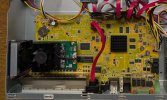
Mine has come shipping with V5.05.335 build 250604 which is the same as yours was running. The board in the 32ch. looks quite a bit different too.
 

Attachments

  • PXL_20251211_145438108.jpg
    PXL_20251211_145438108.jpg
    530.3 KB · Views: 8
Mine has come shipping with V5.05.335 build 250604 which is the same as yours was running. The board in the 32ch. looks quite a bit different too.
I think you need to go to .351 to get AcuSeek working on Hik-Connect. Then .361 adds Perimeter Protection engine (as all NXIs have for non AcuSense cams) but using that will be at the expense of losing AcuSearch and AcuSeek as there are two engines, you cannot have Search without Seek (and vice versa), plus each uses its own engine. Really these models are only good for use with AcuSense cams as a third engine would be needed for Perimeter or motion2.0.
 
I got it from a serial number search on Hik-Partner Pro, but that will now give you the latest .365:

Download Link of Firmware_3000682406_ML_V5.05.365_251029

Release Notes:

Thanks, I'm now registered on the Partner Site, should have done this years ago lol. Just downloading the 4.7GB file now. Release notes claim performance fixes too. I did noticed some live view stuttering so maybe this will fix it. It seem to stutter each keyframe so as my keyframe is set to the same as the FPS I was seeing a tiny freeze in the live view every second.
 
Thanks, I'm now registered on the Partner Site, should have done this years ago lol. Just downloading the 4.7GB file now. Release notes claim performance fixes too. I did noticed some live view stuttering so maybe this will fix it. It seem to stutter each keyframe so as my keyframe is set to the same as the FPS I was seeing a tiny freeze in the live view every second.
Check your settings in Device Access for video. When you move cameras from one NVR to another they can change. As an example I use H264 on my cameras but as NVRs have a default setting of 'allow H265 for initial access' enabled, all of my cameras were switched to H265 with their maximum bitrates halved. It can be worse if you use plug and play, as Hikvision have started using H265+ by default on newer models.

Due to the file size updates are slooooooooww. It's recommended to use USB for sizes greater than 1GB. I had to clamber around in the loft to install a USB extension that would be accessible.
 
Back
Top